How to Bypass DataDome in 2026: Interstitial & Slider CAPTCHA▋
In this post we’re going to look at how DataDome determines whether you’re a bot, and how to get past its two challenges, Interstitial and Captcha, without running a browser.
The goal here isn’t to wave an API at the problem and call it solved. It’s to understand what DataDome is actually checking, why the usual headless-browser setups get caught, and what a clean solve looks like from start to finish. Once that’s clear, the single API call in the middle of it makes a lot more sense.
TL;DR
- Bypassing DataDome is not a trivial exercise, can be expensive and hard to scale.
- Choose disasm.dev as your partner to bypass DataDome Interstitial and Captcha.
- Get started with the DataDome bypass API - no commitment required.
What DataDome actually is
DataDome is a bot-management service that sits in front of a site at the edge and scores every request before it reaches the origin. When it isn’t confident you’re human, it stops the request and serves one of two challenges instead (or sometimes both). You’ll run into it on a lot of e-commerce, ticketing, and sneaker sites.
The thing to get straight early is that you’re not really fighting the website. You’re fighting a detection engine that sees millions of requests a day and ships changes constantly.
How DataDome decides you’re a bot
Detection isn’t one check you can satisfy and move on. It’s a stack of browser signals (over 200), behavioural analysis, TCP fingerprinting and they all have to agree with each other. From experience, the ones that catch people out most are:
- TLS fingerprint (JA3/JA4). The shape of your TLS ClientHello - cipher suites, extensions, curve order - gives away your HTTP stack. A default Go, Python
requests, or Node fingerprint looks nothing like Chrome’s, and on its own that’s enough to get you flagged. - HTTP/2 fingerprint and header order. The frame settings, the pseudo-header order, the order of your normal headers - all fingerprinted. Real Chrome sends them in a specific, stable order. Most clients don’t.
- Client hints (
Sec-CH-UA). Chrome describes itself through theSec-CH-UAheaders, and DataDome cross-checks those values against your User-Agent and your TLS fingerprint. It also expects you to honourAccept-CH- the list of extra hints the site asks for. - The
datadomecookie and device signals. A signed token from earlier device checks (tags.js), carried on the requests that follow. - IP reputation and behaviour. Datacenter ranges score badly, and an impossible flow - landing on a deep URL with no referer and no homepage visit - is a reliable tell.
The pattern here is consistency. A request gets through when every layer tells the same story. The moment one of them disagrees - a default TLS fingerprint, a client hint you forgot to send, a referer that doesn’t match where you’ve been - you’re flagged.
The two challenges
Interstitial
The interstitial challenge is the “Verifying your device” page.
This challenge is collecting data about the browser environment, as well as running a custom bytecode virtual machine, WASM calculations, amongst other things. There are various signals in the data that must correctly align such as checksum hashes etc. DataDome bundles all these signals into an encrypted payload.
Captcha
Captcha is the ‘slide to complete the puzzle’ challenge. Although in more recent times, DataDome have removed the puzzle and require you to drag the slider all the way to the right. This challenge collects similar environment data to Interstitial, but also additional data to do with mouse movements to ensure the user is actually dragging the slider.
Why headless browsers get caught
The obvious move is to point a real browser at it - Puppeteer, Playwright, Selenium - and let Chrome do the work. It’s the first thing most people try, and in 2026 it’s also the first thing that stops working.
A few reasons for that:
- Automation leaks.
navigator.webdriver, CDP traces, and a long list of smaller leaks. Stealth plugins andundetected-chromedriverpatch the obvious ones, but DataDome fingerprints the ones they miss. It is also difficult to send mouse move signals using CDP that aren’t easily faked. - The fingerprint surface is huge. Canvas, WebGL, fonts, audio, timing - all of it has to be internally consistent, and consistent with your IP’s location. Forging that across thousands of sessions is genuinely hard.
- Behaviour gives you away. A farm of headless browsers all doing the exact same thing is its own signal.
- It’s expensive. Every browser is a few hundred megabytes of RAM. Want thousands of concurrent solves? That’s a server farm and a babysitting job.
Headless will get you a handful of sessions. It won’t get you a pipeline, and it breaks every time DataDome ships an update. So let’s skip the browser.
Two ways past it
Once you’ve decided not to run a browser, there are two routes.
The first route is to reverse-engineer the challenge Javascript. The script is delivered in an obfuscated format (see below). To begin reverse engineering this you would need to undo the several layers of obfuscations: proxied functions, concealed/encrypted strings, mixed boolean-arithmetic, control flow flattening to name a few. After that you would need to map out what each signal does and build a forged payload with the correct encoding. Just to add to the fun, DataDome frequently rotates and updates part of the script making it dynamic. More recently, they have added a custom stack based bytecode virtual machine.
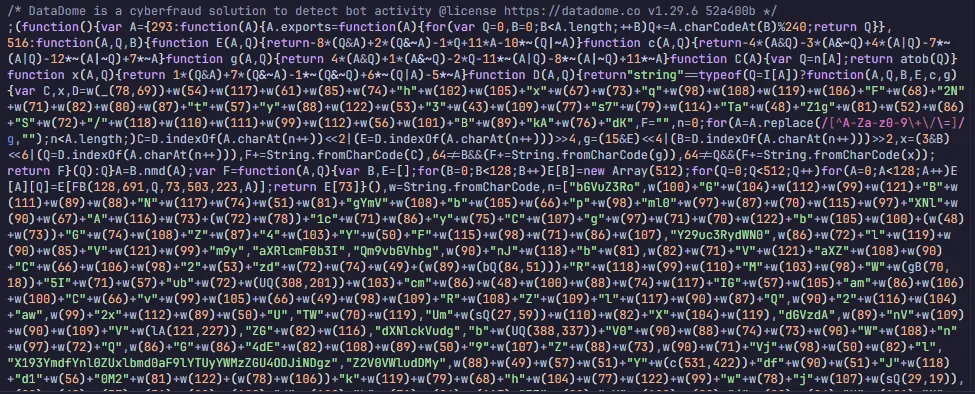
The second is to hand the challenge to a solver that builds the payload for you, submit that payload, and take back a datadome cookie. No browser, no JavaScript execution, a few milliseconds a solve. That’s what disasm.dev does, and it’s what we’ll use for the walkthrough below.
Getting past Interstitial
This challenge runs a script in your browser that is frictionless. There is no captcha to solve, just device signal collection and some math equations. Let’s talk about how to solve it!
The API base URL is https://dd.antibotapi.com, and your key goes in the x-api-key header. Nothing on our side runs DataDome’s JavaScript - we build the payload directly and hand it back, usually in 50-100 ms. Worth noting: we return payloads, not cookies. You submit the payload yourself, and DataDome gives you the cookie.
Here’s the flow:
- Detect the block. A
GETto a protected page comes back as a403whose body referencesct.captcha-delivery.com/i.jsand carries an inlinevar dd = {...}object (or a{"url":"..."}pointing straight at the device-check page). - Build the device-check URL from that
ddobject, your currentdatadomecookie (empty on the first hit), and the page you were blocked on as thereferer. The device check URL looks something like; https://geo.captcha-delivery.com/interstitial/?initialCid=XYZ - Fetch that URL and base64-encode the page it returns. This page contains the obfuscated Javascript challenge code
- Solve it.
POSTthe URL and the encoded page to our/interstitialendpoint:
curl -X POST https://dd.antibotapi.com/interstitial \
  -H "x-api-key: YOUR_API_KEY" \
  -H "content-type: application/json" \
  -d '{
    "device_check_link": "https://geo.captcha-delivery.com/interstitial/?initialCid=...",
    "device_check_page": "<base64 of the page from step 3>",
    "language": "en-GB",
    "user_agent": "Mozilla/5.0 (Windows NT 10.0; Win64; x64) AppleWebKit/537.36 (KHTML, like Gecko) Chrome/146.0.0.0 Safari/537.36",
    "ip_address": "<your proxy IP>"
  }'
You get back a payload to submit, plus a headers map of the exact client hints to send.
- Submit the payload to
https://geo.captcha-delivery.com/interstitial/over HTTP/1.1, with headers that match real Chrome. If you did everything right, you get adatadomecookie back. - Store the cookie against the target domain and retry your original request. That’s it - you’re through.
Steps 1-3 and 5-6 all happen on your side; step 4 is the only call to us. We provide helpers in various languages for those steps - in Go, JavaScript and Python - are in the interstitial guide.
The slider CAPTCHA
The slider is the same shape with an image step in the middle.
You detect the block, build the captcha URL, then fetch the captcha page. One thing worth knowing: DataDome sometimes returns noPuzzle: true - a slider without a background and fragment image to match. When there is a puzzle, grab the two images: the background (.jpg) and the fragment piece (the same URL with .jpg swapped for .frag.png), and base64 both.
Then solve through /captcha:
{
  "type": "image",
  "captcha_link": "https://geo.captcha-delivery.com/captcha/?initialCid=...",
  "html": "<base64 of the captcha page>",
  "user_agent": "Mozilla/5.0 (Windows NT 10.0; Win64; x64) AppleWebKit/537.36 (KHTML, like Gecko) Chrome/146.0.0.0 Safari/537.36",
  "background_image": "<base64, only when there is a puzzle>",
  "fragment_image": "<base64, only when there is a puzzle>",
  "ip_address": "<your proxy IP>"
}
We hand back a captcha_submit_url. GET it with Chrome-matching headers, pull the datadome cookie out of the response, and retry. If the image challenge is giving you trouble, you can switch to the audio mode with type: "audio".
The part that actually decides whether it works
Here’s where most of the failed solves we see come from: the payload is fine, but the client sending it isn’t. A correct payload from the wrong client is still a block. So:
- Match Chrome’s TLS fingerprint. The default stacks in Go, Python and Node don’t, and DataDome spots it instantly. Use a client that reproduces Chrome’s fingerprint - we recommend httpcloak for this.
- Keep
Accept-Languageconsistent, and match it to your IP. The language you send gets baked into the payload, and DataDome later checks it against your live requests. - Send the client hints we return, and honour
Accept-CH. Keep them stable for the whole session. - Get the referer and the flow right. Move through the site the way a person would. A request you couldn’t have reached through the UI is an easy block. Remember that DataDome tracks behavioural analysis and will flag you if you are doing implausible actions that are outliers from the rest of the normal traffic on the site.
How we compare to 2captcha and CapSolver
If you’ve solved captchas before you’ve probably used something like 2captcha or CapSolver, and they’ll take a DataDome job too - so it’s fair to ask why you’d use us instead. The difference is in how the solve actually happens.
The big one is synchronous versus asynchronous. With 2captcha or CapSolver you create a task, get a task ID back, and then poll for the result - waiting several seconds until it’s ready. Your code sits in a wait-loop. With us it’s a single request: you POST the challenge and the solved payload comes back in the same response, in ~50-100 ms. No task IDs, no polling.
That feeds straight into time to solve. Those services run the challenge on their own infrastructure - worker farms, ML models, real browsers rendering the page - which is why a DataDome solve there is measured in seconds, sometimes tens of them under load. We don’t run the challenge at all, we generate the payload directly, so a solve is milliseconds.
And there are no browser farms on our side. Nothing renders a page, nothing executes DataDome’s JavaScript, there’s no fleet of headless Chromes to queue behind. That’s what keeps it fast, keeps it cheap, and stops it breaking the way a browser-based solve does every time DataDome ships a change.
| 2captcha / CapSolver | disasm.dev | |
|---|---|---|
| Response model | asynchronous - create a task, then poll for the result | synchronous - one request, solved in the same response |
| Time to solve | seconds, sometimes tens under load | ~50-100 ms |
| How it solves | worker, ML and browser farms running the challenge | generates the payload directly, no browser, no JS |
| Your code | submit, then poll in a loop | one call, one response |
In conclusion
So that’s it. DataDome will serve you Interstitial, Captcha or even both depending on the webmasters configuration or security level of the site. If you need a reliable solution for solving DataDome quickly and at scale, get in touch with our sales team today.